
These checks are a rough guide to help you notice changes. They cannot diagnose a condition or replace an eye examination. Results depend on your screen, its brightness and your distance from it.
1. Amsler grid: check your central vision
The Amsler grid helps people notice early changes in the centre of their vision, such as those caused by macular degeneration.
- Wear your reading glasses if you use them.
- Hold your screen at a comfortable reading distance, in good light.
- Cover one eye and look steadily at the dot in the centre.
- While looking at the dot, notice whether all the lines look straight and all the squares look the same size.
- Repeat with the other eye.
What your result means
- All lines straight, no gaps: no change shown today. Keep having regular eye check-ups.
- Wavy, bent, blurred or missing lines: book an eye examination within a few days.
- A sudden new change or a dark patch: see an eye doctor the same day.
2. Near vision card: check your reading vision
Hold your phone or screen at about 40 centimetres, roughly the distance you read a book, with your reading glasses on if you use them. Read down the lines below and note the smallest line you can read comfortably.
1 Eyes are precious.
2 Read this line at forty centimetres.
3 Good light makes reading easier for everyone.
4 Hold the screen at a comfortable reading distance, about one arm’s length away.
5 If small print looks blurred, you may need reading glasses or an updated prescription.
6 Most people notice that close focusing gets harder from their early forties. This is called presbyopia and it is easy to correct.
7 This is the smallest line. If you can read it comfortably, your near vision at this distance is likely to be good.
What your result means
- You can read line 6 or 7 comfortably: your near vision is probably fine at this distance.
- You stop at line 4 or 5, or you hold the screen further away: you may need reading glasses or a new prescription. Book an eye test.
- One eye is much worse than the other, or reading has suddenly got worse: book an eye examination soon.
3. Colour vision plates: check for red-green colour deficiency
Each plate below is made of coloured dots. People with normal colour vision see a number in each one. Type the number you see, then press check. Use full screen brightness and turn off night mode or blue light filters.
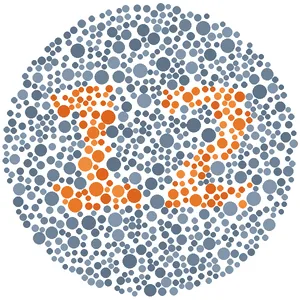
Practice plate. Almost everyone sees this number.
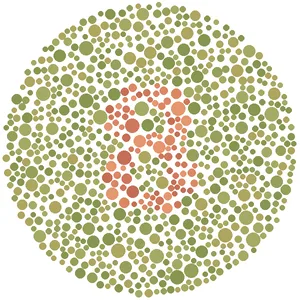
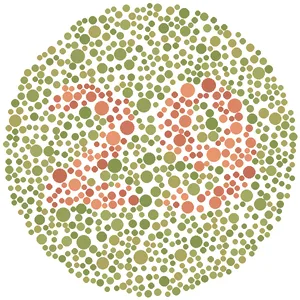
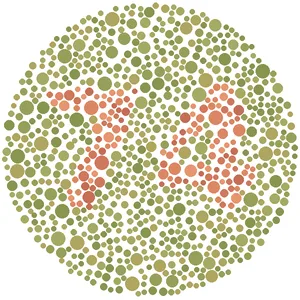
Your result
You read all the plates correctly. This suggests normal red-green colour vision on this screen.
You missed one or more plates. This can happen with screen settings, but it may also suggest a colour vision deficiency. A proper test at an eye clinic will confirm it.
You missed the practice plate, so this test may not be working on your screen. Please have your colour vision checked at a clinic.
These plates were created for this website and are not a standard clinical test. Please see an eye doctor for a proper assessment.